Reminders and alarms
Medication Reminders and Alarms for iPhone
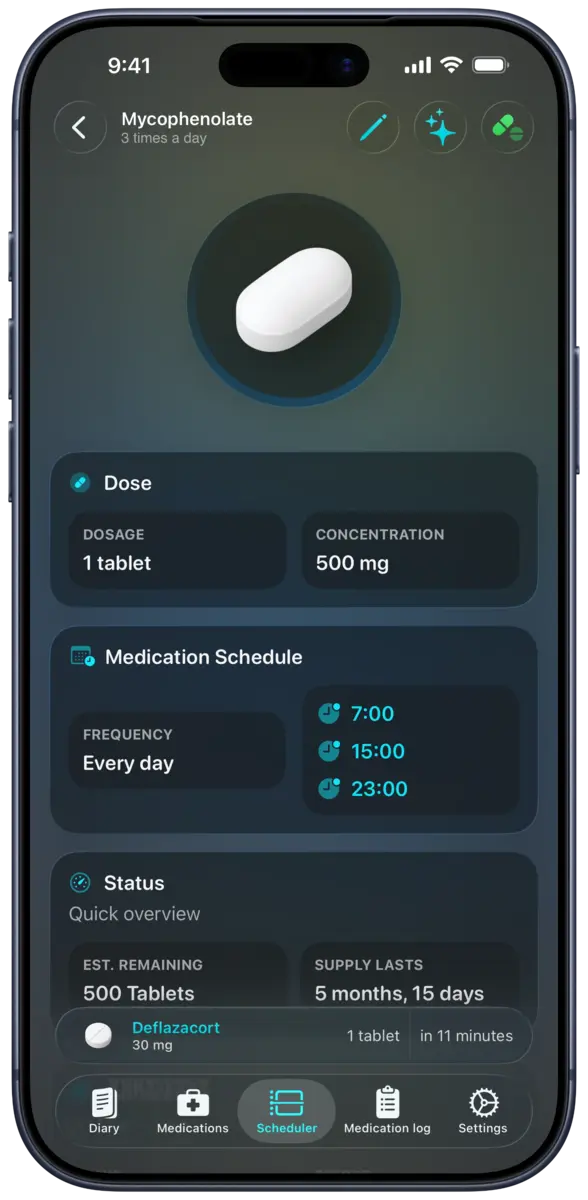
DoseKeeper lets you create medication reminders for different days and times on iPhone and iPad. Supported schedules can use alarm-based or critical alerts, while missed-dose follow-ups and optional post-intake alarms help you keep track of what still needs attention.
How it works
From setup to review
Add a medicine
Enter the medicine and the amount you take. DoseKeeper does not decide the dose for you.
Build the schedule
Choose the days and times, use the Timing Assistant for repeating intervals, and record food-related instructions when they apply.
Choose the alert
Use a standard reminder or an available alarm option for a supported schedule, then log the dose when you take it.
What you can manage
What this feature includes
- Different times or days for each medicine
- Multiple scheduled times for one medicine
- Timing Assistant for schedules that repeat every few hours
- Food and time-of-day scheduling context
- Critical alerts for supported scheduled medicines
- Missed-dose follow-up reminders
- Post-intake alarms after a medicine is logged
Available in version 4.4
Grouped reminders and alarms
DoseKeeper 4.4 combines medicines scheduled for the same time into one reminder or alarm and lets you review and record the group together.
- One notification for medicines that share a scheduled time
- A grouped review before recording the medicines
- Grouped medication logging from the shared reminder
Available in version 4.5
More control over follow-up reminders
DoseKeeper 4.5 lets you choose a specific time or a countdown for missed-dose and post-intake reminders, with scheduling that keeps each reminder tied to its dose and scheduled time.
- Choose a clock time or countdown for a missed-dose follow-up
- Choose a clock time or countdown after recording a medicine
- Find scheduled doses in Spotlight and open them in DoseKeeper
Availability
Where it works
Scheduling and reminders are available on iPhone and iPad. DoseKeeper also has an Apple Watch app for viewing schedules and logging medicine. Critical alerts and other alert behavior depend on device permissions and supported configurations.
Free and Pass
What the plan changes
The free tier supports up to 3 medicines and 2 scheduled doses. DoseKeeper Pass removes those limits and adds advanced features.
Important context
What to keep in mind
DoseKeeper organizes schedules and provides notifications; it does not prescribe a dose, replace medication instructions, or guarantee that a notification will be delivered when device permissions or system conditions prevent it.
FAQ
Questions about medication reminders
Can every DoseKeeper schedule use an alarm?
No. Alarm-based behavior is limited to supported schedules and device configurations. Standard medication reminders remain distinct from alarm and critical-alert options.
Can reminders repeat several times a day?
Yes. A medicine can have multiple scheduled times, and the Timing Assistant can help create intervals that repeat every few hours from a selected start time.
What happens after I miss a scheduled dose?
DoseKeeper can provide a follow-up reminder for a missed scheduled dose so it remains visible for review. You decide how to handle the medication based on your own instructions.
Start tracking with DoseKeeper
Use DoseKeeper free with up to 3 medicines and 2 scheduled doses. Upgrade to DoseKeeper Pass when you need unlimited use and advanced features.