Faster setup
Scan Medicine Packaging to Add Details Faster
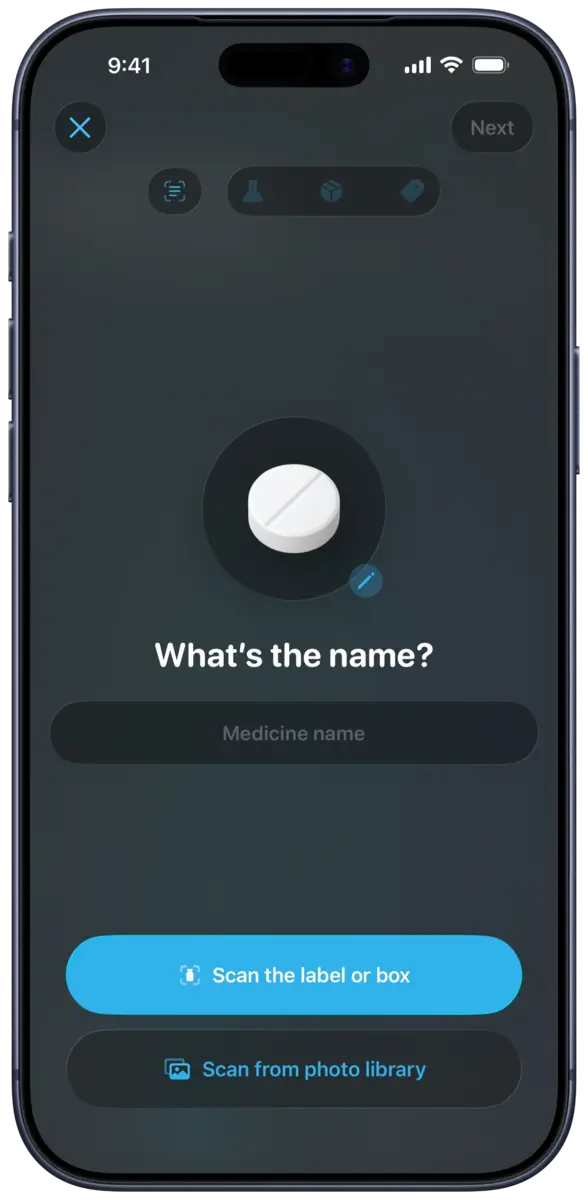
On supported devices, DoseKeeper can scan medicine packaging and help prefill details such as the medicine name, concentration, and type. The result is a starting point for setup, and you should review and correct every field before saving the medicine.
How it works
From setup to review
Choose a source
Scan the label or box with the camera, or select a packaging image from the photo library.
Let DoseKeeper prefill
Supported on-device intelligence attempts to recognize available medicine details.
Review before saving
Compare every recognized field with the packaging and correct anything incomplete or inaccurate.
What you can manage
What this feature includes
- Medicine name recognition
- Concentration recognition
- Medicine type recognition
- Camera and photo-library input
- Prefilled medicine setup on supported devices
Available in version 4.4
Optional Deep Scanning with Apple Private Cloud Compute
On supported iOS 27 devices, DoseKeeper 4.4 can recognize more packaging details with optional Deep Scanning through Apple Private Cloud Compute. Local Vision text recognition supplies on-device OCR evidence for verification; if that path does not complete, the app falls back to its on-device scan.
- Medicine name, strength, unit, and form
- Printed supply quantity and unit when supported by visible text
- Expiration date with evidence checks
- Blister pocket count and supported layout
- Local OCR evidence used to ground quantity and expiration results
- A review step before any recognized supply information becomes a saved batch
Availability
Where it works
Medicine scanning requires a supported iPhone or iPad, appropriate camera or photo permissions, and the operating-system intelligence features available for the device, language, and region.
Free and Pass
What the plan changes
The current App Store listing does not separately state a scanning-specific Pass requirement. Free-tier medicine limits still apply.
Important context
What to keep in mind
Recognition can be incomplete or wrong. DoseKeeper does not verify the package against a clinical drug database, and the user must review all recognized information before saving or using it.
FAQ
Questions about medicine scanning
Does DoseKeeper add a medicine without my review?
No. Scanning is intended to prefill supported fields. Review the medicine name, concentration, type, and all other details before saving.
Does the released scanner use Private Cloud Compute?
DoseKeeper 4.4 can use Apple Private Cloud Compute for optional Deep Scanning on supported iOS 27 devices. If that path does not complete, the app falls back to its on-device scan.
Can scanning identify every package?
No. Packaging, language, image quality, and device support can affect recognition, and results may be incomplete or inaccurate.
Start tracking with DoseKeeper
Use DoseKeeper free with up to 3 medicines and 2 scheduled doses. Upgrade to DoseKeeper Pass when you need unlimited use and advanced features.